 {width=1920 height=2105}
Kubernetes Dashboard 是 Kubernetes 官方提供的通用 Web UI,用于管理 Kubernetes 集群中的应用和资源。它提供了直观的可视化界面,帮助用户轻松查看和管理集群中的各种资源。
Kubernetes Dashboard 由一组微服务组成,每个服务服务于特定目的。从版本 7.0.0 开始,Dashboard 仅支持基于 Helm 的安装,因为其多容器设置和对 Kong Gateway 作为中央 API 代理的依赖。
graph TB
    subgraph "Kubernetes Dashboard Repository"
        subgraph "Core Modules"
            web["Web<br>(Angular Frontend)"]
            api["API<br>(Go Backend)"]
            auth["Auth<br>(Authentication)"]
            metrics["Metrics Scraper<br>(Performance Data)"]
            common["Common<br>(Shared Code)"]
        end

        subgraph "Deployment"
            charts["Helm Charts"]
        end

        web --> common
        api --> common
        auth --> common
        metrics --> common

        web & api & auth & metrics --> charts
    end
{width=1920 height=2105}
Kubernetes Dashboard 遵循微服务架构,以中央 API 代理(Kong Gateway)路由流量并向用户公开 UI。
graph TD
    User["Browser User"] -->|"Access"| Ingress["Ingress Controller"]
    Ingress -->|"Routes to"| Kong["Kong Gateway API Proxy"]

    subgraph "Kubernetes Dashboard Components"
        Kong -->|"Routes to"| WebUI["Web UI<br>Angular Frontend"]
        Kong -->|"Routes to"| API["API Module<br>REST/GraphQL Backend"]
        Kong -->|"Routes to"| Auth["Auth Module<br>Authentication"]
        API -->|"Uses"| MetricsScraper["Metrics Scraper<br>Performance Monitoring"]
    end

    WebUI -->|"HTTP Requests"| API
    API -->|"Queries"| K8sAPI["Kubernetes API"]
    MetricsScraper -->|"Collects from"| MetricsServer["Metrics Server"]
    Auth -->|"Validates"| K8sAPI
 {width=1920 height=2824}
Kubernetes Dashboard 由几个核心组件组成,每个组件负责特定功能:
| 组件 | 技术 | 目的 |
|---|---|---|
| Web UI | Angular 16 | 提供与 Kubernetes 集群交互的用户界面 |
| API Module | Go | 处理 REST 和 GraphQL API 请求,与 Kubernetes API 交互 |
| Auth Module | Go | 管理认证和授权 |
| Metrics Scraper | Go | 从 Kubernetes Metrics Server 收集性能指标 |
| Kong Gateway | Kong | 中央 API 代理,在组件之间路由流量 |
Web UI 使用 Angular 构建,为 Dashboard 提供用户界面。它与 API 模块通信以获取和操作 Kubernetes 资源。
关键技术:
API 模块作为 Dashboard 的后端,提供 REST 和 GraphQL API 以供前端交互。它与 Kubernetes API 通信以管理集群资源。
关键技术:
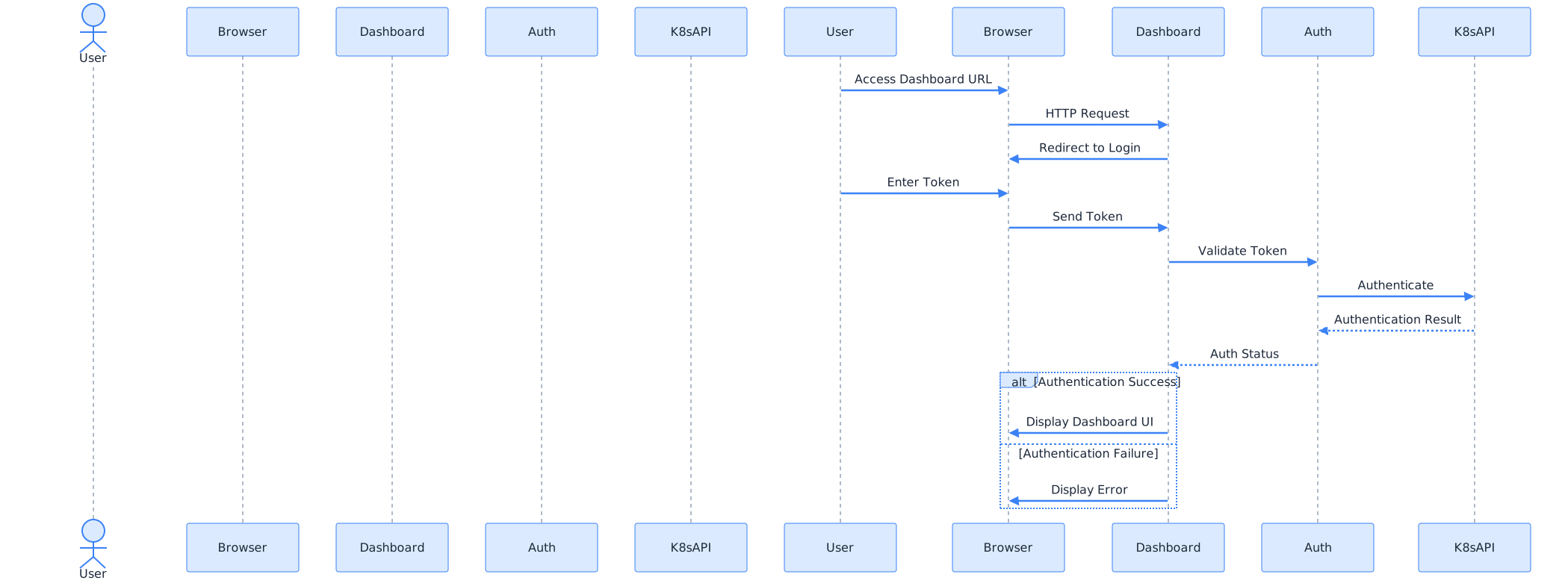
认证模块处理 Dashboard 的认证和授权。它根据 Kubernetes API 服务器验证用户令牌。
sequenceDiagram
    actor "User" as User
    participant "Browser" as Browser
    participant "Dashboard" as Dashboard
    participant "Auth Service" as Auth
    participant "Kubernetes API" as K8sAPI

    User->>Browser: Access Dashboard URL
    Browser->>Dashboard: HTTP Request
    Dashboard->>Browser: Redirect to Login

    User->>Browser: Enter Token
    Browser->>Dashboard: Send Token
    Dashboard->>Auth: Validate Token
    Auth->>K8sAPI: Authenticate
    K8sAPI-->>Auth: Authentication Result
    Auth-->>Dashboard: Auth Status

    alt Authentication Success
        Dashboard->>Browser: Display Dashboard UI
    else Authentication Failure
        Dashboard->>Browser: Display Error
    end
 {width=2099 height=777}
Metrics Scraper 从 Kubernetes Metrics Server 收集性能指标,并将其存储以在 Dashboard 中进行可视化。
关键技术:
Kubernetes Dashboard 使用 Helm 作为一组容器部署在 Kubernetes 集群中。Helm Chart 在 kubernetes-dashboard 命名空间中创建必要的资源。
graph TD
    subgraph "Kubernetes Cluster"
        subgraph "kubernetes-dashboard Namespace"
            kongDeploy["Kong Gateway Deployment"]
            apiDeploy["API Deployment"]
            webDeploy["Web UI Deployment"]
            authDeploy["Auth Deployment"]
            metricsDeploy["Metrics Scraper Deployment"]

            kongSvc["Kong Service"]
            apiSvc["API Service"]
            webSvc["Web Service"]
            authSvc["Auth Service"]
            metricsSvc["Metrics Service"]
        end

        ingress["Ingress Resource"]
        metricsServer["Kubernetes Metrics Server"]
    end

    helmChart["Helm Chart"] -->|"Installs"| kongDeploy & apiDeploy & webDeploy & authDeploy & metricsDeploy

    kongDeploy --> kongSvc
    apiDeploy --> apiSvc
    webDeploy --> webSvc
    authDeploy --> authSvc
    metricsDeploy --> metricsSvc

    ingress --> kongSvc
    kongSvc --> webSvc & apiSvc & authSvc
    metricsDeploy -->|"Queries"| metricsServer
 {width=2096 height=808}
Kubernetes Dashboard 使用模块化构建系统,以 Makefile 作为主要的编排工具。这构建各个模块并生成 Docker 镜像,然后打包到 Helm Chart 中。
graph LR
    subgraph "Development Process"
        code["Source Code"]
        build["Build Process"]
        docker["Docker Images"]
        helm["Helm Chart"]
        deploy["Deployment"]
    end

    code -->|"make build"| build
    build -->|"Create"| docker
    docker -->|"Package"| helm
    helm -->|"helm install"| deploy
 {width=1920 height=6782}
推荐使用 Helm Chart 安装 Kubernetes Dashboard:
# 添加 Kubernetes Dashboard 仓库
helm repo add kubernetes-dashboard https://kubernetes.github.io/dashboard/
helm repo update

# 安装 Dashboard
helm install kubernetes-dashboard kubernetes-dashboard/kubernetes-dashboard \
  --create-namespace \
  --namespace kubernetes-dashboard

# 创建管理员 ServiceAccount
kubectl create serviceaccount dashboard-admin -n kubernetes-dashboard

# 创建 ClusterRoleBinding
kubectl create clusterrolebinding dashboard-admin \
  --clusterrole=cluster-admin \
  --serviceaccount=kubernetes-dashboard:dashboard-admin

# 获取访问令牌
kubectl get secret -n kubernetes-dashboard \
  $(kubectl get serviceaccount dashboard-admin -n kubernetes-dashboard -o jsonpath="{.secrets[0].name}") \
  -o jsonpath="{.data.token}" | base64 --decode
如果不使用 Helm,可以直接应用官方的 YAML 文件:
# 部署 Dashboard
kubectl apply -f https://raw.githubusercontent.com/kubernetes/dashboard/v3.0.0-alpha0/charts/kubernetes-dashboard.yaml

# 创建管理员用户
kubectl apply -f - <<EOF
apiVersion: v1
kind: ServiceAccount
metadata:
  name: admin-user
  namespace: kubernetes-dashboard
---
apiVersion: rbac.authorization.k8s.io/v1
kind: ClusterRoleBinding
metadata:
  name: admin-user
roleRef:
  apiGroup: rbac.authorization.k8s.io
  kind: ClusterRole
  name: cluster-admin
subjects:
- kind: ServiceAccount
  name: admin-user
  namespace: kubernetes-dashboard
EOF
# 创建端口转发
kubectl port-forward -n kubernetes-dashboard service/kubernetes-dashboard-kong-proxy 8443:443
然后访问 https://localhost:8443
创建 Ingress 资源以提供外部访问:
apiVersion: networking.k8s.io/v1
kind: Ingress
metadata:
  name: kubernetes-dashboard
  namespace: kubernetes-dashboard
  annotations:
    nginx.ingress.kubernetes.io/backend-protocol: "HTTPS"
spec:
  ingressClassName: nginx
  rules:
  - host: dashboard.example.com
    http:
      paths:
      - path: /
        pathType: Prefix
        backend:
          service:
            name: kubernetes-dashboard-kong-proxy
            port:
              number: 443
获取 ServiceAccount 的访问令牌:
 kubectl get secret -n kubernetes-dashboard \
   $(kubectl get serviceaccount admin-user -n kubernetes-dashboard -o jsonpath="{.secrets[0].name}") \
   -o jsonpath="{.data.token}" | base64 --decode
Dashboard 也支持使用 kubeconfig 文件进行认证,需要配置适当的 RBAC 权限。
无法访问 Dashboard
认证失败
权限不足