 {width=1920 height=1037}
k9s 是 Kubernetes 集群管理的高效终端 UI 工具,支持键盘驱动操作、实时监控和资源管理,极大提升了命令行用户的运维效率和体验。
k9s 是专为 Kubernetes 设计的终端用户界面工具,采用类似 Vim 的操作方式,通过键盘快捷键实现高效导航和操作,是 kubectl 的强大补充。
k9s 遵循清晰的架构模式,将 UI 展示、Kubernetes 资源访问和应用逻辑分离。下图展示了主要架构组件及其交互关系。
```mermaid “k9s 架构总览” graph TD User[“User”] –> CLI[“CLI/Cobra Commands”] CLI –> App[“K9s App”] App –> Config[“Configuration System”] App –> UI[“UI System”] App –> K8sClient[“Kubernetes Client”] K8sClient –> K8sAPI[“Kubernetes API”] UI –> Views[“Resource Views”] UI –> Table[“Table System”] UI –> Menu[“Menu”] UI –> Prompt[“Prompt”] Views –> ResourceViewers[“Resource Viewers”] ResourceViewers –> DAOs[“Data Access Objects”] ResourceViewers –> Renderers[“Renderers”] DAOs –> K8sClient Config –> Styles[“Styles”] Config –> Plugins[“Plugins”] Config –> HotKeys[“HotKeys”] Config –> Aliases[“Aliases”] subgraph “Core Components” App UI K8sClient Config end subgraph “Resource Management” DAOs Renderers ResourceViewers end

{width=2762 height=1565}
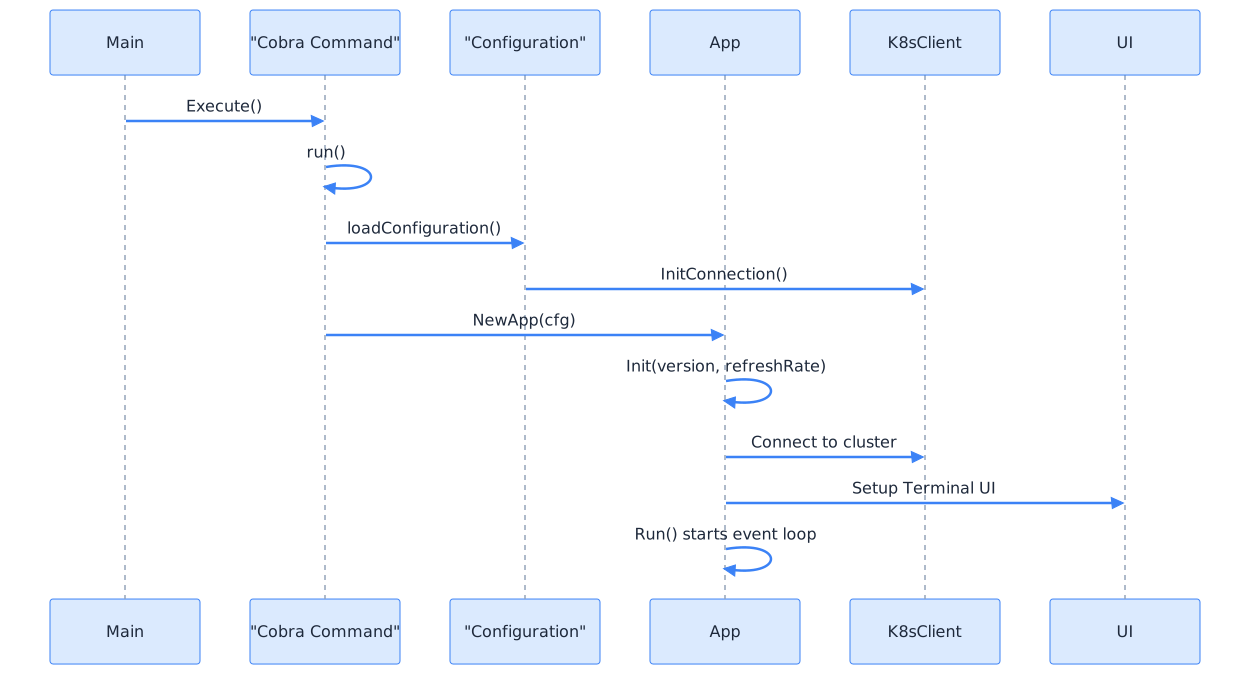
应用启动流程如下:
```mermaid "k9s 应用启动流程"
sequenceDiagram
participant Main
participant Cobra as "Cobra Command"
participant Config as "Configuration"
participant App
participant K8sClient
participant UI
Main->>Cobra: Execute()
Cobra->>Cobra: run()
Cobra->>Config: loadConfiguration()
Config->>K8sClient: InitConnection()
Cobra->>App: NewApp(cfg)
App->>App: Init(version, refreshRate)
App->>K8sClient: Connect to cluster
App->>UI: Setup Terminal UI
App->>App: Run() starts event loop
{width=1920 height=1037}
k9s 通过模块化设计实现高效的资源管理和用户交互,以下为主要组件说明。
命令系统解释用户输入并将其转换为操作,支持导航、过滤和 Kubernetes 操作。
```mermaid “k9s 命令系统” graph TD User[“User”] –>|”Types command”| CmdBuff[“Command Buffer”] CmdBuff –>|”Interprets”| Interpreter[“Command Interpreter”] Interpreter –>|”Parses”| CommandObj[“Command Object”] CommandObj –>|”Executes”| Action[“Application Action”] CommandObj –>|”Resource Command”| ResourceViewer[“Resource Viewer”] CommandObj –>|”Context Command”| ContextSwitch[“Context Switch”] CommandObj –>|”Namespace Command”| NamespaceSwitch[“Namespace Switch”] CommandObj –>|”Special Command”| SpecialAction[“Special Action”] subgraph “Command Execution” ResourceViewer ContextSwitch NamespaceSwitch SpecialAction end

{width=1920 height=1292}
### 配置系统
k9s 使用分层配置系统,结合全局默认值、用户偏好和上下文特定设置。
```mermaid "k9s 配置系统"
graph TD
ConfigFile["Config Files"] -->|"Load"| ConfigSystem["Configuration System"]
Flags["CLI Flags"] -->|"Override"| ConfigSystem
ConfigSystem -->|"Global Config"| GlobalConfig["Global K9s Config"]
ConfigSystem -->|"Context Config"| ContextConfig["Context-Specific Config"]
GlobalConfig --> UI["UI Settings"]
GlobalConfig --> Logger["Logger Settings"]
GlobalConfig --> General["General Settings"]
ContextConfig --> Namespace["Active Namespace"]
ContextConfig --> View["Active View"]
ContextConfig --> Aliases["Command Aliases"]
ContextConfig --> HotKeys["Custom HotKeys"]
subgraph "Configuration Hierarchy"
GlobalConfig
ContextConfig
end
 {width=1920 height=765}
k9s 通过统一的 ResourceViewer 接口表示不同的 Kubernetes 资源,Browser 是主要实现,用于显示表格数据。
```mermaid “k9s 资源视图系统” classDiagram class ResourceViewer { «interface» +Init(context.Context) error +App() *App +Start() +Stop() +GetTable() *Table } class Table { -model *model.Table +Init(context) +Update(data) +Start() +Stop() } class Browser { -table *Table -accessor dao.Accessor -meta *metav1.APIResource +Init(context.Context) +SetInstance(path) +SetContextFn(ContextFunc) } class LogViewer { -model *model.Log -logs *Logger +Init(context.Context) +SetContainer(container) } ResourceViewer <|.. Browser ResourceViewer <|.. LogViewer Browser *– Table

{width=1920 height=2916}
### 数据访问层
k9s 使用 DAO 模式抽象 Kubernetes 资源检索和操作。
```mermaid "k9s 数据访问层"
graph TD
App["App"] --> Factory["Watch Factory"]
Factory -->|"Creates"| Accessor["Resource Accessor"]
Factory -->|"Manages"| Informers["K8s Informers"]
Accessor -->|"Resource-specific"| ResourceDAO["Resource-specific DAO"]
ResourceDAO -->|"Retrieves"| K8sObjects["Kubernetes Objects"]
ResourceDAO -->|"Pod"| PodDAO["Pod DAO"]
ResourceDAO -->|"Deployment"| DeploymentDAO["Deployment DAO"]
ResourceDAO -->|"Service"| ServiceDAO["Service DAO"]
Informers -->|"Watch"| K8sAPI["Kubernetes API"]
subgraph "Data Access Layer"
Factory
Accessor
ResourceDAO
Informers
end
 {width=1920 height=1428}
| 组件 | 类型 | 角色 |
|---|---|---|
| App | 核心 | 协调所有其他组件的主应用程序 |
| Command | 核心 | 解释和执行用户命令 |
| Browser | 视图 | 显示表格数据的通用资源查看器 |
| Table | UI | 显示表格数据的 UI 组件 |
| DAO | 数据 | Kubernetes 资源的数据访问对象 |
| Factory | 数据 | 创建和管理 Kubernetes informers/watchers |
| Config | 配置 | 管理应用程序配置 |
| K9s | 配置 | 存储 K9s 特定配置 |
k9s 提供丰富的功能,满足日常运维和开发调试需求。
k9s 支持多种安装方式,适配主流操作系统。
macOS (Homebrew):
brew install k9s
Ubuntu/Debian:
curl -LO https://github.com/derailed/k9s/releases/latest/download/k9s_linux_amd64.deb
sudo dpkg -i k9s_linux_amd64.deb
CentOS/RHEL/Fedora:
curl -LO https://github.com/derailed/k9s/releases/latest/download/k9s_linux_amd64.rpm
sudo rpm -i k9s_linux_amd64.rpm
go install github.com/derailed/k9s@latest
kubectl krew install k9s
kubectl k9s
k9s 会自动检测和使用现有的 kubeconfig 文件:
# 查看当前配置
k9s --help

# 指定特定 kubeconfig 文件
k9s --kubeconfig ~/.kube/config

# 连接到特定集群
k9s --cluster my-cluster
k9s 提供丰富的视图和快捷操作,提升集群管理效率。
:pods - Pod 管理视图:deployments - Deployment 管理视图:services - Service 管理视图:configmaps - ConfigMap 管理视图:secrets - Secret 管理视图:jobs - Job 管理视图:cronjobs - CronJob 管理视图:nodes - 节点管理视图h/l 或 ←/→ - 左右移动j/k 或 ↑/↓ - 上下移动g/G - 跳到顶部/底部/ - 搜索模式n/N - 下一个/上一个搜索结果Enter - 查看资源详情e - 编辑资源 (YAML)d - 删除资源l - 查看日志s - 查看资源使用的 Secretp - 端口转发: - 命令模式,输入资源类型Tab - 在不同面板间切换Ctrl-a - 显示所有命名空间Ctrl-n - 选择命名空间k9s 支持插件、皮肤、别名和快捷键等多种扩展方式,满足个性化需求。
k9s 支持自定义插件扩展功能:
# 创建插件目录
mkdir -p ~/.config/k9s/plugins

# 创建插件文件
cat > ~/.config/k9s/plugins/plugin.yaml <<EOF
plugins:
  trouble-shoot:
    shortCut: Shift-T
    description: Trouble shoot pod
    scopes:
    - pods
    command: kubectl
    background: false
    args:
    - describe
    - $NAME
    - -n
    - $NAMESPACE
EOF
在 Pod 视图中按 Shift-T 执行故障排查插件。
自定义界面主题:
# 创建皮肤目录
mkdir -p ~/.config/k9s/skins

# 创建自定义皮肤
cat > ~/.config/k9s/skins/my-skin.yaml <<EOF
k9s:
  body:
    fgColor: dodgerblue
    bgColor: black
  info:
    fgColor: white
    bgColor: black
  frame:
    fgColor: dodgerblue
    bgColor: black
EOF
自定义命令别名:
# 编辑配置文件
k9s info

# 在配置文件中添加别名
aliases:
  dp: deployments
  po: pods
  svc: services
k9s 通过配置文件、别名、热键和皮肤实现高度定制。
```mermaid “k9s 配置与定制” graph TD User[“User”] –>|”Edits”| ConfigFiles[“Configuration Files”] ConfigFiles –>|”k9s.yaml”| GlobalConfig[“Global Config”] ConfigFiles –>|”context_{name}.yaml”| ContextConfig[“Context-specific Config”] ConfigFiles –>|”aliases.yaml”| Aliases[“Command Aliases”] ConfigFiles –>|”hotkeys.yaml”| Hotkeys[“Custom Hotkeys”] ConfigFiles –>|”{skin}.yaml”| Skins[“UI Skins/Themes”] GlobalConfig –>|”Loads on startup”| App[“K9s App”] ContextConfig –>|”Loads on context switch”| App Aliases –>|”Command resolution”| Command[“Command System”] Hotkeys –>|”Key bindings”| UI[“User Interface”] Skins –>|”Colors and styles”| UI ConfigWatcher[“Config Watcher”] -.->|”Watch for changes”| ConfigFiles ConfigWatcher -.->|”Hot reload”| App

{width=1920 height=847}
## 实用场景
k9s 适用于日常运维、开发调试和生产环境管理,以下为常见场景示例。
### 日常运维
- 快速查看集群状态:
```bash
k9s
# 默认进入 Pod 视图,快速概览集群状态
```
- 监控应用部署:
```bash
k9s -c deployments
# 直接进入 Deployment 视图
```
- 排查 Pod 问题:
```bash
k9s -c pods
# 选择有问题的 Pod,按 'l' 查看日志
# 按 'd' 查看详细信息
```
### 开发调试
- 实时日志监控:
```bash
k9s
# 选择 Pod,按 'l' 进入日志视图
# 使用 '/' 搜索特定日志内容
```
- 配置调试:
```bash
k9s -c configmaps
# 查看配置映射内容
```
- 网络诊断:
```bash
k9s -c services
# 查看服务端点状态
```
### 生产运维
- 资源监控:
```bash
k9s -c nodes
# 查看节点资源使用情况
```
- 批量操作:
```bash
k9s -c pods -n production
# 在生产命名空间中管理 Pod
```
- 安全审计:
```bash
k9s -c secrets
# 查看密钥资源
```
## 配置选项
k9s 支持多种配置文件,满足不同环境和个性化需求。
### 配置文件位置
- Linux/macOS: `~/.config/k9s/config.yaml`
- Windows: `%APPDATA%\k9s\config.yaml`
### 常用配置示例
```yaml
k9s:
ui:
enableMouse: false
logoless: true
crumbsless: false
clusters:
my-cluster:
namespace:
active: default
favorites:
- kube-system
- default
plugins:
trouble-shoot:
shortCut: Shift-T
command: kubectl
args:
- describe
- $NAME
k9s 提供多种故障排查手段,帮助用户快速定位和解决问题。
k9s 通过模块化架构将 UI、数据访问和业务逻辑分离,命令系统作为中央协调器,配置系统支持高度定制。资源查看系统和数据访问层为 Kubernetes 资源管理提供一致接口,极大提升了集群运维和开发效率。